Description

All Kind of Mobile Repairs Picture Help, Flash File and Software & Hardware Solution with Application.

All China Charging 100% Solutions

If you have further Questions please don't hesitate to leave a comment. Every repairing solution posted here is tested by at least one member of our team. These Images Technique Are Uploaded By BLOG OWNER For Teaching And Study Purpose So We Will Not Be Responsible For Any Damage In Your Mobile It Is Your Responsibility To Use The Method As Mentioned In The Posts.

This is default featured slide 2 title

Go to Blogger edit html and find these sentences.Now replace these sentences with your own descriptions.

This is default featured slide 3 title

Go to Blogger edit html and find these sentences.Now replace these sentences with your own descriptions.

This is default featured slide 4 title

Go to Blogger edit html and find these sentences.Now replace these sentences with your own descriptions.

This is default featured slide 5 title

Go to Blogger edit html and find these sentences.Now replace these sentences with your own descriptions.

Showing posts with label Keypad Problem. Show all posts

Tuesday, 29 October 2013

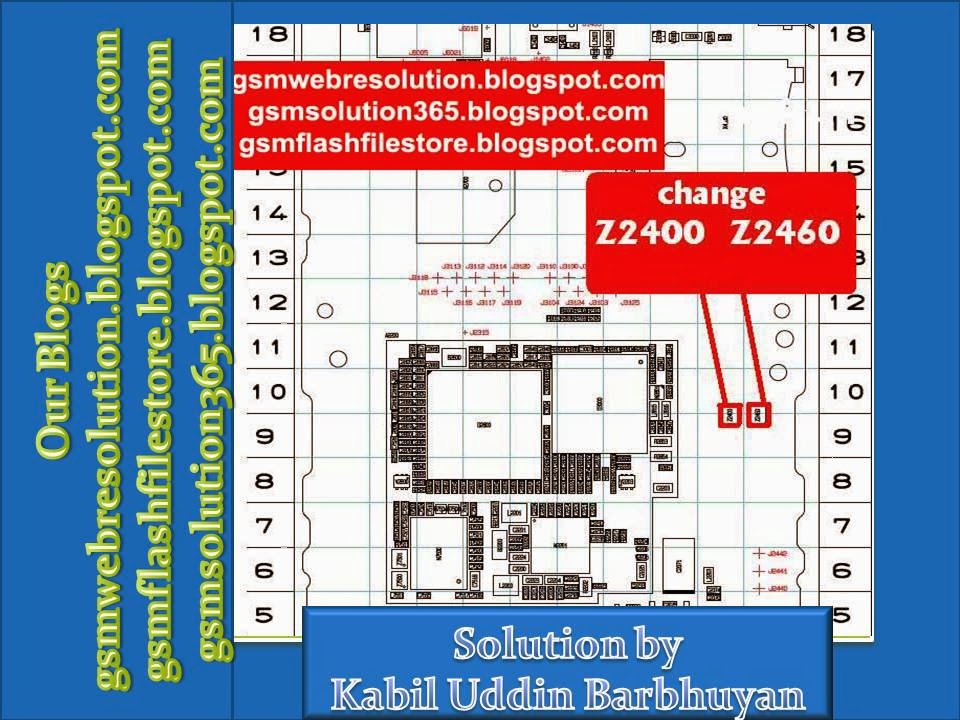
Nokia C3-00 Keypad Problem Solution

Nokia C3-00 Keypad Problem Repairing Solutions are available in the
following article. Also you will find Nokia C3-00 Keypad Solution
information in the diagrams further in this article. If your cell
phone is having one of these faults check these diagrams out and do
the solutions step by step.

In Nokia C3-00 Keypad problem can occur because of the faulty Keypad
IC or the Keypad's bad connection to the Cell Phone's PCBA
Motherboard. Bad connections can happen for many reasons like if it's
dropped or got wet, bad connection may also happen because of Carbon,
Rust or even Dirt. So first of all you should clean Nokia C3-00 Keypad
Solution Ways and PCBA Motherboard of the Mobile Phone.

You Can Use any cleaning liquid for this purpose like CTC or any other
you prefer. If you are certain that the bad connection is not the
reason for your Mobile Phone's fault, then you can replace the Keypad
IC with a new one.

You can also try to Re ball your Keypad IC. But please keep this in
mind that this is not an easy process. It is a tricky method and if
you do not have much experience in the Mobile Phones Repairing field
you many damage your phone irreversibly, So it is not recommended. If
you still want to do it here is rough guide on how to Re Ball an IC.

How To Reball IC Guide With Diagrams

If the problem still remains then you should continue with the
following repairing solutions.

Here is a list of all the solutions for the mentioned problems or
faults available at the moment. Please Note that we will edit these
solutions or add new ones if found in this page at any time in the
future. So feel free to come back any time on this page to stay up to
date.

C3-00 Keypad Problem
C3-00 Keypad Ways
C3-00 Keypad Jumpers
C3-00 Keypad Solution

If you have further Questions please don't hesitate to leave a comment.

Every repairing solution posted here is tested by at least one member
of our team.
These Images & Technique Are Uploaded By BLOG OWNER For Teaching And
Study Purpose So We Will Not Be Responsible For Any Damage In Your
Mobile It Is Your Responsibility To Use The Method As Mentioned In The
Posts.

Monday, 14 October 2013

Nokia 3120c Keypad Solution Ways Problem

Nokia 3120c Keypad Solution Problem Repairing Diagrams are available in the following article. Also you will find Nokia 3120c Keypad Ways and Jumpers information in the diagrams further in this post.

In Nokia 3120c Keypad Solution problem can occur because of the faulty Keypad IC bad connection to the Cell Phone’s Motherboard. So first of all you should clean Nokia 3120c Keypad Ways and Motherboard of the Mobile Phone. If cleaning does not work then you can replace the Keypad IC.

Please Note that we will edit these solutions or add new ones if found in this page at any time in the future. So feel free to come back any time on this page to stay up to date.


If you have further Questions please don’t hesitate to leave a comment.

Note: Every repairing solution posted here is tested by at least one member of our team. Use the information available here at Your Own Risk. We are not responsible if any harm comes to your device during the repairing process.

Nokia 2700c Keypad Not Working Problem Solution

Nokia 2700c Keypad Problem Repairing Solutions are available in the following article. Also you will find Nokia 2700c Keypad Ways and Jumpers information in the diagrams further in this post.

In Nokia 2700c Keypad problem can occur because of the faulty Keypad IC bad connection to the Cell Phone’s Motherboard. So first of all you should clean Nokia 2700c Keypad Ways and Motherboard of the Mobile Phone. If cleaning does not work then you can replace the Keypad IC.

Please Note that we will edit these solutions or add new ones if found in this page at any time in the future. So feel free to come back any time on this page to stay up to date.


If you have further Questions please don’t hesitate to leave a comment.

Note: Every repairing solution posted here is tested by at least one member of our team. Use the information available here at Your Own Risk. We are not responsible if any harm comes to your device during the repairing process.

Nokia 2700c Keypad Led Problem Solution

Nokia 2700c Keypad Light Problem Repairing Solutions are available in the following article. Nokia 2700c Keypad Led Ways and Jumpers information can also be found in the diagrams further in this post.

In Nokia 2700c Keypad Light Problem can occur because of the faulty Led Drivers or it’s bad connection to the Cell Phone’s Motherboard. Before doing any hardware solution you should clean Nokia 2700c Keypad Led Ways Lights IC and Motherboard of the Mobile Phone. If cleaning does not work then you can replace the Lights IC.

Please Note that we will edit these solutions or add new ones if found in this page at any time in the future. So feel free to come back any time on this page to stay up to date.


If you have further Questions please don’t hesitate to leave a comment.

Note: Every repairing solution posted here is tested by at least one member of our team. Use the information available here at Your Own Risk. We are not responsible if any harm comes to your device during the repairing process.